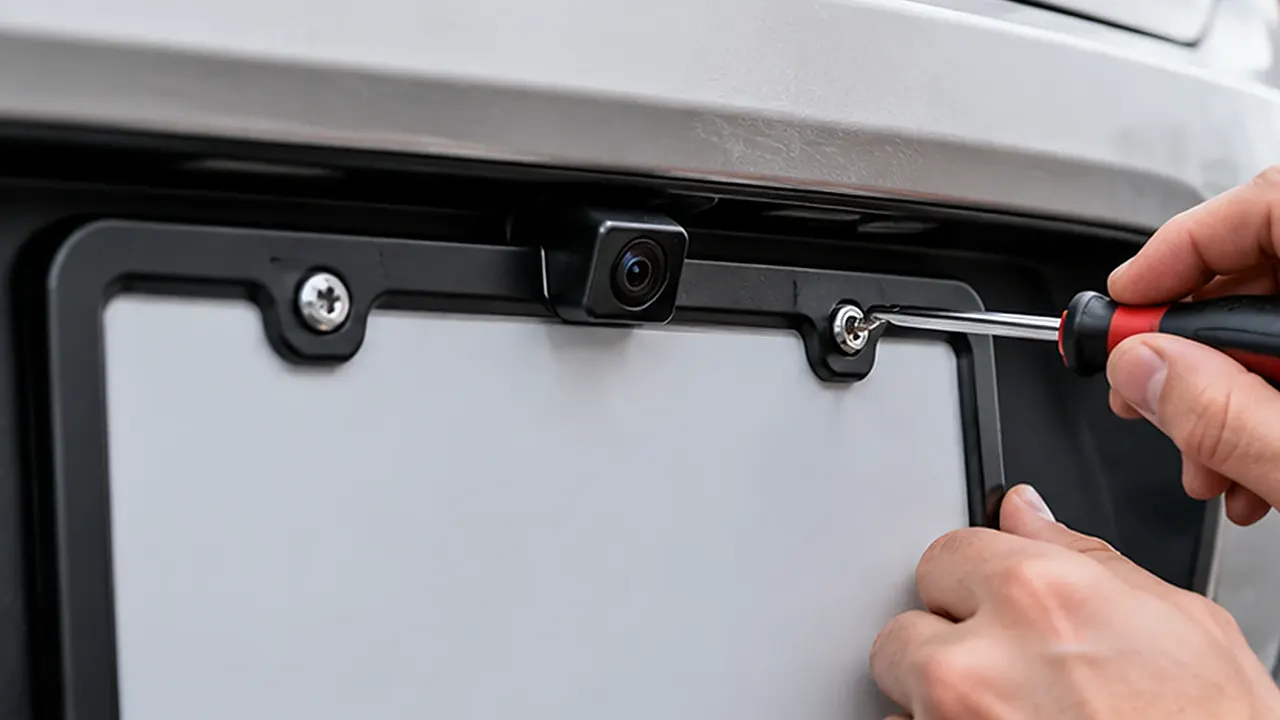
To install a license plate backup camera, confirm that the camera fits the plate area and works with your display, test its position before permanent mounting, and follow the camera and vehicle instructions for power and cable routing. Refit the plate and any compatible frame without covering required information or the plate lights. Test the completed installation while the vehicle is stationary before relying on it.
The plate screws are often the easiest part. A camera that bolts on neatly can still give an obstructed picture, pinch a cable, interfere with a tailgate, or require an electrical interface your vehicle doesn’t provide directly. Check those details before taking the rear trim apart.
Identify the Camera System You Actually Have
A plate-mounted camera may be a small camera on a crossbar, a clip-on unit, or part of a complete replacement surround. Some communicate with a separate monitor; others need a compatible head unit or navigation display. An original factory camera and its vehicle electronics are a different installation problem from adding an independent aftermarket system.
Find the exact model instructions, including the wiring diagram and display requirements. A matching plug shape does not prove matching signal format, power, pin arrangement, or operation. An existing head unit may require a specific adapter or configuration even when it has a socket marked for a camera.
“Wireless” usually describes how part of the system communicates, not a promise that there are no wires or power requirements. Identify how the camera, transmitter if present, and screen each receive power. Battery-powered designs have their own charging and attachment instructions.
Don’t replace a factory safety-related camera with an unrelated plate camera and assume the original functions remain available. If the project affects an existing vehicle system, ask the vehicle manufacturer or a qualified installer how the proposed equipment integrates with it.
Check Compatibility Before Removing the Plate
Lay out the camera, mounting pieces, wiring, connectors, instructions, and intended display. Confirm that all required parts are present. Avoid starting a permanent installation when the needed interface, extension cable, or vehicle-specific instructions are missing.
| Check | What you need to establish | What can go wrong |
|---|---|---|
| Display compatibility | Supported camera signal and connection | Power is present but no usable picture |
| Power arrangement | Approved supply and activation method | Unreliable operation or battery drain |
| Mounting geometry | Hole positions, recess, and camera clearance | Bar or camera contacts the body |
| Plate visibility | Numbers, required text, and validation areas | Accessory overlaps required information |
| Cable path | Protected entry and moving-panel clearance | Pinched insulation or water entry |
| Field of view | Useful view with the assembly fitted | Bumper, frame, or spare tire blocks the image |
Plate dimensions differ across countries and vehicle types. Compare your actual plate and mounting points with the camera bracket, not just a regional product label. The license plate frame size guide explains why the visible opening and hole layout matter alongside outside size.
Prepare the Vehicle and Work Area
Park on a level surface away from traffic. Secure the vehicle according to its instructions and keep people clear of its path. Plan tests so nobody stands behind a vehicle that could move. A helper should never be used as a target for checking the picture.
Gather tools called for by the camera and vehicle procedures, suitable trim tools, clean protective cloths, and the specified electrical connection materials. Wear the protection required for the work. Avoid improvised drilling, wiring, or sealant choices simply because they are already in your toolbox.
Read the vehicle’s instructions before disconnecting a battery, removing powered trim, or working near electrical components. Modern vehicles can have specific shutdown requirements, stored-energy systems, and settings affected by disconnection. There is no universal battery sequence appropriate for every car.
If the job involves high-voltage components, airbag areas, unfamiliar control modules, or inaccessible wiring, stop and use a qualified installer. Adding a low-power accessory doesn’t make every nearby vehicle system safe to disturb.
Step 1: Photograph and Remove the Existing Assembly
Photograph the plate, screws, spacers, frame, and bracket before removal. Record which fasteners go where, especially if they differ in length or thread. Protect the painted surface beneath the work area and support the plate as the last screw comes out.
Remove only the parts needed for the installation. Decorative screw caps may conceal fasteners, while an existing holder may include clips or tabs. Don’t pry the entire bracket away because the plate screws are loose.
Inspect the vehicle mounting points. Cracked plastic inserts, stripped threads, a bent holder, or corroded screws should be addressed before adding camera weight or extra layers. A camera mounting bar doesn’t repair a damaged attachment point.
Clean the plate area with products appropriate to the surfaces and let it dry. Keep solvents away from lenses and electrical connections. This is also a convenient time to remove trapped dirt behind the frame without turning the project into an aggressive restoration of the plate face.
Step 2: Test the Camera Position Before Permanent Fixing
Hold or temporarily secure the camera using the maker’s approved test method. Check the intended view with the plate, frame, and any nearby trim represented in their final positions. An unobstructed view with the frame removed may become blocked when everything is refitted.
Look for vehicle-specific obstructions: a deep plate recess, tailgate handle, spare tire, tow equipment, projecting bumper, or door-mounted accessory. Open the tailgate or rear door carefully to check movement and clearance while the vehicle remains secured.
Connect temporary test equipment only as permitted by the camera instructions and with appropriate protection. Don’t create exposed improvised power connections near bodywork. If a safe temporary electrical test isn’t clear, ask an installer to perform it before any drilling or permanent attachment.
Test from the driver’s normal viewing position. The display needs to be usable without blocking driving visibility or important controls. A clear camera image isn’t helpful if the screen itself is badly positioned.
Step 3: Work Out the Plate, Camera, and Frame Order
There is no universal stacking order. A crossbar may fit in front of a plate, another bracket may clip to an edge, and a complete camera surround may replace an ordinary decorative frame. Follow the camera’s illustrated assembly rather than assuming every accessory belongs under the same screw head.
Dry-fit the components without forcing alignment. Check whether the plate remains flat, the camera can be adjusted, and the decorative border clears the lens. Also inspect where screw heads, washers, and any supplied caps will sit.
Adding a mounting bar or frame changes the thickness of the assembly. Use the specified hardware and verify thread engagement and rear clearance. Longer screws are not automatically safer; they may bottom out, damage inserts, or contact something behind the mounting surface.
If your existing license plate frame conflicts with the camera, remove or replace the incompatible frame rather than bending the camera bar. A decorative border is optional; secure mounting, useful visibility, and required plate information are not.
Step 4: Plan the Cable Route Before Closing Anything
Trace the complete route from the camera to its next connection, then to the display or transmitter arrangement specified for the system. Include the size of connectors, not just the cable diameter. A small opening that accepts bare wire may not accept the connector without damage.
Use an approved existing cable entry where available and appropriate. Don’t push a cable through a drain opening or compromise an existing grommet seal. If the instructions require a new opening, inspect both sides and have the work done correctly, including edge protection and corrosion treatment where applicable.
Keep the cable away from sharp sheet-metal edges, hot components, exhaust parts, and moving mechanisms. At a tailgate or hatch, account for the full range of movement, including the transition between the moving panel and body. A route that looks tidy with the hatch open can be stretched when it closes.
Allow service access without leaving loose loops where they can snag. Use appropriate clips or supports, and avoid over-tightening ties against cable insulation. Don’t attach the new wiring to an airbag harness or an unidentified loom merely because it follows a convenient path.
Step 5: Follow the Documented Power and Trigger Arrangement
The camera instructions determine its acceptable power supply. The vehicle information determines which circuits are suitable and how an accessory may connect. You need both. Never choose a supply based only on the color of a wire found in a general video.
A reverse-lamp circuit may be part of an approved installation, but modern lamp control can make direct connection unsuitable for some equipment. A vehicle-specific interface, relay arrangement, or other approved solution may be necessary. Don’t splice into a data network or control-module connection to experiment.
Keep the required fuse protection and use connectors appropriate to the wire size and environment. Electrical tape alone is not a substitute for a properly made, protected connection. Any connection exposed to water needs the treatment specified by the equipment manufacturer.
A reverse trigger is also not necessarily the camera’s power supply. One connection may tell the display when to show the image, while another supplies the camera. Follow the diagram for your exact system and have an automotive electrical professional handle anything that remains unclear.
Step 6: Secure the Camera and Protect Connections
Once the position and operation have been tested, mount the camera with the specified hardware. Tighten to the documented requirement when provided. Don’t invent a torque value or use extra force to pull a crooked bar into alignment.
Secure separate modules in locations suitable for their environment and service needs. A camera housing described as water resistant doesn’t establish that its fuse holder, plugs, or transmitter can tolerate the same exposure. Evaluate each component and connection individually.
Use the specified grommets, seals, and connection protection. Don’t fill an area indiscriminately with sealant; it can obstruct drainage, hide an unprotected joint, or make future servicing difficult. A clean external appearance doesn’t prove the entry is sealed correctly.
Before reinstalling trim, inspect the cable path again. Make sure a trim clip, screw, or sharp flange won’t press into the new wiring. Keep photographs of hidden routes so a later repair doesn’t require guessing where the cable runs.
Step 7: Refit the Plate and Check Every Clearance
Refit the plate and compatible frame in the order established during the dry fit. Start fasteners correctly by hand and tighten evenly as the instructions require. Watch for bowing or components that move out of alignment while tightening.
Check the entire face of the plate, not only its large characters. Required jurisdiction information and validation areas vary. The camera body, bar, frame border, screw caps, and cable should all be considered together when checking obstruction.
Inspect the plate lights. An accessory can leave the characters physically uncovered while casting a shadow or obstructing the light source. Check the illumination in low light after the assembly is complete, without looking directly into bright lamps.
Open and close the hatch or rear door carefully, checking the final routing and camera clearance. Confirm that the camera doesn’t interfere with a handle, latch, washer nozzle, or the vehicle’s existing rear camera if one remains in use.
Adjust the View With Stationary Test Objects
Use a clear, level area and stationary, non-damaging reference objects placed while the vehicle is secured. Keep people out of its possible path. Follow the camera maker’s procedure for orientation and any adjustable guidance lines.
Check that the image is upright and that left and right behave as the system instructions describe. A front-view camera setting or incorrectly configured image can make a rear installation misleading even when the picture looks sharp.
Don’t assume overlay lines show a certified stopping distance or the vehicle’s exact swept path. Fixed lines and dynamic vehicle-generated guidance serve different functions. Adjust only what the system supports, and understand the limits described in its manual.
Look at the lower and outer parts of the picture for obstructions from the bumper, hitch, frame, or housing. Position is a tradeoff between the useful field of view and the physical mounting constraints; aim for the documented setup, not the widest-looking image at any cost.
Test Activation, Lighting, and Moving Panels
With the vehicle safely secured and the manufacturer’s test procedure followed, check when the display activates and turns off. Observe whether the camera starts reliably and whether the screen returns to its intended function afterward. Don’t diagnose activation by repeatedly moving the vehicle in a confined space.
Test under more than one lighting condition. At night, glare from the plate lamps or nearby surfaces can change the usable picture. Make permitted adjustments only after checking that the lens is clean and nothing blocks the view.
For a wireless system, evaluate the actual installed positions with trim refitted and doors in their normal positions. A successful bench test isn’t the same as a reliable installed connection. Large metal obstructions and equipment placement may matter to the particular system.
Recheck cable clearance through the full hatch or tailgate movement. An image that disappears only when the panel moves is a reason to inspect the wiring and connections, not to keep opening and closing it until the fault becomes permanent.
Troubleshoot by Symptom, Not by Random Rewiring
If the installation doesn’t work, stop and compare the actual assembly with the diagrams. Change one documented item at a time. Don’t replace fuse ratings, move connections to unknown circuits, or bypass protection to see whether the picture returns.
| Symptom | First useful checks | Avoid |
|---|---|---|
| No image at all | Display input, supported signal, documented power and activation | Assuming a matching plug proves compatibility |
| Image appears intermittently | Connections, approved supply, cable movement, system pairing | Repeatedly flexing a suspected damaged cable |
| Image is inverted or reversed incorrectly | Camera orientation and supported settings | Treating a misleading picture as normal |
| Frame or bumper appears in the view | Final assembly and allowed camera adjustment | Bending the bracket to gain an angle |
| Picture changes when hatch moves | Cable strain, pinching, and moving-panel routing | Leaving the cable stretched |
| Glare after dark | Lens cleanliness, lamp position, reflective nearby surfaces | Covering required plate lighting |
Electrical testing should follow the vehicle and equipment instructions. If you aren’t equipped to make the relevant measurements safely, an installer can usually narrow the problem more effectively than repeated parts swapping.
When to Use a Professional Installer
Professional installation is sensible when the vehicle needs a head-unit interface, controlled lamp circuit integration, trim removal near sensitive equipment, or a new sealed cable entry. It is also appropriate when you can’t identify the camera system or obtain its instructions.
Tell the installer whether you want to retain the original frame, avoid permanent holes, or preserve factory camera functions. Those preferences affect the possible arrangements, but they don’t override the system’s compatibility requirements.
Ask for a demonstration of activation, image orientation, plate lighting, and hatch movement before accepting the work. Request the wiring and component information needed for later servicing. Keep the user instructions available for anyone else who drives the vehicle.
Leave Access for Plate and Registration Changes
Consider the next time the plate, registration sticker, or decorative frame needs attention. A camera arrangement that traps the plate behind permanently bonded parts can turn a routine change into a wiring job. Check that the approved assembly remains serviceable without cutting a cable or bending the mount.
Keep the supplied security tool and fastener information with the vehicle records. If a fastener differs from the original plate hardware, note where it belongs. That can prevent a later installer from fitting the wrong screw or trying to release a clip as though it were threaded.
Before anyone removes the assembly, explain that a camera cable is attached. The plate should be supported rather than allowed to hang from it. Follow the equipment instructions for disconnecting the system, and inspect its routing and view again after reassembly. A small change in camera angle can make an old guide-line adjustment inappropriate.
Care for the Installation Afterward
Inspect the camera mount and visible cable after the first period of ordinary use and after work near the plate area. Look for movement, rubbing, loose fasteners, damaged insulation, or signs of water at connections. Follow the maker’s inspection requirements rather than applying a universal retightening interval.
Clean the lens with its specified method. Plate-cleaning chemicals, abrasive pads, and close pressure-washer jets may not be suitable for it. When cleaning behind the plate and frame, protect the camera and avoid pulling on its wiring.
A backup camera is an aid, not permission to stop checking your surroundings. Dirt, glare, mounting position, or an object outside its field of view can limit what you see. If its operation becomes unreliable, address the fault and use appropriate safe driving practices rather than assuming the last clear image still represents the area behind you.
Frequently Asked Questions
Can I install a camera without drilling new plate holes?
Some systems use existing plate mounting points or an edge clip. That doesn’t establish that the complete installation needs no new cable entry or other vehicle modification. Check both the mechanical mount and the wiring route before buying equipment or promising a reversible installation.
Can the camera go above or below the plate?
That depends on the camera design, vehicle geometry, useful field of view, and plate information that must remain visible. A lower position isn’t automatically a solution when the top of the plate has a sticker. Test the permitted arrangement and follow the specific mounting instructions.
Does a wireless camera still need power wiring?
It may. Wireless communication and power are separate questions. Identify how each component is powered, including any transmitter and display. Some designs use a battery with charging requirements; others connect to the vehicle. The product name alone doesn’t tell you which arrangement applies.
Can I keep my current frame?
Only if the camera instructions and final fit allow it. Check the lens opening, screw engagement, plate visibility, and lamp clearance with the complete stack fitted. If the frame conflicts, choose a compatible arrangement instead of forcing the components together or covering required plate information.