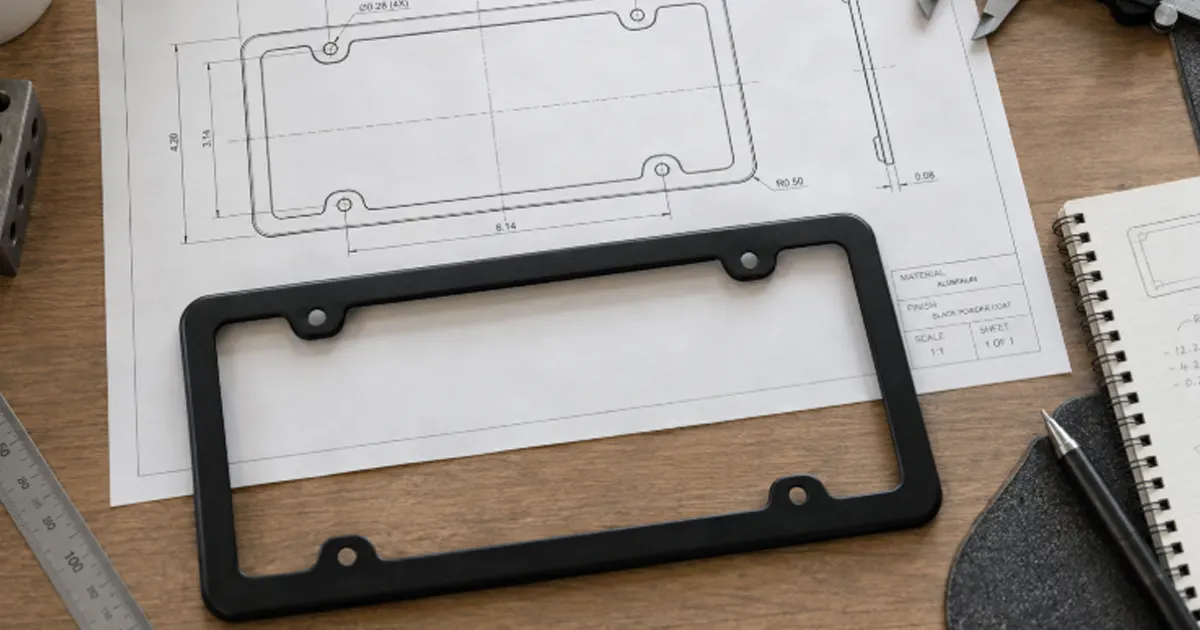
A usable license plate frame CAD drawing does more than trace the outside shape. It defines how the frame relates to the plate, how the assembly mounts to the vehicle, which areas must remain visible, and which dimensions actually control fit. Without that information, a clean-looking model can still produce blocked plate details, misaligned screws, weak borders, or a frame that sits proud of the mounting surface.
You normally need three coordinated files: a 3D model for shape, a 2D engineering drawing for controlled dimensions and tolerances, and a separate artwork file for logos or decoration. Each answers a different question. Combining them into one ambiguous file creates more risk than convenience.
Start with the three installation interfaces
A frame touches more than one part, so “the hole spacing” or “the overall size” is rarely enough. Identify the interfaces separately before adding dimensions.
| Interface | What the drawing should control | What can go wrong |
|---|---|---|
| Plate to frame | Visible opening, border overlap, plate seating area, edge clearance, and any retaining lip or clip | The frame hides characters or registration details, or the plate cannot sit flat |
| Frame to hardware | Hole or slot geometry, head and washer clearance, counterbore or recess, and local thickness | Screws bind, washers bridge a step, or tightening damages the finish |
| Assembly to vehicle or bracket | Mounting pattern, rear clearance, curvature, stand-off, and interference envelope | The frame rocks, bows, touches trim, or cannot reach the threaded mounting points |
Keep these dimensions tied to a controlled reference instead of assuming that every plate, bracket, and vehicle uses the same geometry. If you are still establishing the mounting pattern, measure the plate, frame, and vehicle as separate parts; the mounting-hole spacing method explains that distinction in practical terms.
A 3D model, 2D drawing, and artwork file are not interchangeable
The 3D model communicates form well, but it usually does not carry every manufacturing requirement. A 2D drawing makes the design intent explicit, while a vector artwork file preserves the graphic geometry needed for printing, engraving, or raised decoration.
| Deliverable | Best use | It should not be expected to replace |
|---|---|---|
| 3D CAD model | Overall form, curved surfaces, ribs, bosses, clips, recesses, and assembly checks | Controlled tolerances, finish notes, inspection criteria, and revision approval |
| 2D engineering drawing | Datums, dimensions, tolerances, sections, material, finish, units, and revision | Complex surface geometry that is already defined in the model |
| Vector artwork | Logo outlines, print colors, engraving paths, raised-letter shapes, and placement | Structural geometry or mounting dimensions |
| Reference rendering | Showing intended appearance and orientation | Any authoritative production definition |
State which file governs if two files disagree. For example, the CAD model may control the surface shape while the 2D drawing controls the mounting dimensions and finish. A rendering can help everyone see the intent, but it should never silently override a dimensioned drawing.
Establish functional datums before placing dimensions
Dimensions become easier to inspect when they originate from stable, functional references. A practical datum scheme might use the rear mounting plane as the primary reference, the horizontal centerline as a secondary reference, and a vertical centerline or locating edge as the third. The correct choice depends on how the particular frame sits and locates.
Locate holes, slots, openings, and key edges from common datums. Avoid long chains of dimensions in which every small variation accumulates at the last feature. A symmetric design should say whether symmetry is required; it should not rely on appearance alone.
ASME Y14.5 and ISO 129-1 provide established rules for communicating dimensions and tolerances. They do not decide your frame dimensions for you. Note the chosen drawing standard and units in the title block so that symbols, decimal places, and tolerances are interpreted consistently.
Show the dimensions that control fit
The exact list changes with the frame design, but a manufacturing-ready license plate frame CAD drawing usually needs the following information.
| Dimension or feature | Why it matters |
|---|---|
| Overall width and height | Controls the vehicle-space envelope and the relationship to body trim, cameras, lamps, and brackets |
| Visible opening | Controls how much of the plate remains exposed; include corner radii and any local intrusions |
| Border width | Links appearance with strength, artwork space, and plate overlap |
| Hole and slot geometry | Requires center locations, diameter or slot width, slot length, end radii, and orientation |
| Overall and local thickness | Affects stiffness, screw engagement, cap fit, clip behavior, and surrounding clearance |
| Rear stand-offs and contact pads | Determine how the frame sits against the plate, bracket, or vehicle surface |
| Curvature or flatness requirement | Prevents an apparently correct outline from rocking or forcing the plate into an unintended shape |
| Radii, chamfers, and edge breaks | Influence touch safety, coating coverage, forming, molding, and visual quality |
Do not derive the opening from a generic plate label alone. Use the controlled plate reference for the intended market and check what must remain visible in the relevant jurisdiction. The license plate frame size guide is useful for early fit planning, but the production drawing still needs model-specific dimensions.
Use sections to reveal what the front view hides
A front view can make two very different frames look identical. Add cross-sections through mounting holes, border rails, retaining lips, printed or raised areas, clips, ribs, bosses, recesses, and stand-offs. The section should show the installed stack where that stack controls function.
For a screw-mounted frame, show whether the screw head bears on the frame, a washer, or a separate cap base. For a clip-on design, show the clip entry, engagement depth, plate thickness range, and release direction. If the rear surface is stepped or curved, identify the surfaces that may contact the plate or vehicle.
Plastic and stamped-metal designs also need different section information. Molded parts may depend on wall transitions, ribs, bosses, draft, and undercuts. Formed metal parts may need material thickness, bend or draw geometry, and a clear distinction between flat and formed states. The frame mold design explanation goes deeper into the features that affect a molded plastic frame.
Separate artwork boundaries from structural boundaries
A decorative safe area is not the same as the plate opening. Define the maximum artwork envelope, logo position, orientation, and keep-out zones around holes, clips, deep radii, trim edges, and any surface that will be hidden after assembly.
The artwork notes should identify the intended process—such as printing, laser engraving, embossed or raised lettering, or an applied badge—because each process needs different line widths, relief, edge clearance, and color information. Supply outlined vector artwork at the intended scale. A font name or low-resolution screenshot is not a controlled logo file.
If the decoration changes the part geometry, include it in the 3D model and dimension the functional height or depth. If it is only printed, keep the structural model clean and control the graphic through the artwork file and placement dimensions.
Tolerances should follow function, not anxiety
Putting a tight tolerance on every dimension does not make the frame more precise in a useful way. It can raise inspection effort and manufacturing cost without improving fit. Apply tighter control to the features that locate, fasten, clear, retain, or remain visibly aligned. Use an appropriate general tolerance for noncritical dimensions.
Typical candidates for explicit control include mounting-hole position, slot width, opening location, clip engagement, critical rear clearance, and the relationship between the opening and outer border. Cosmetic edge variation may need a different acceptance method from a functional dimension. Geometric tolerancing can clarify position, profile, flatness, or symmetry when those controls improve assembly or inspection; it should not be added merely to make the drawing look technical.
Never leave the drawing and model with conflicting precision. If the drawing shows two decimal places but the title block applies an unrealistically tight default tolerance, the apparent detail can become an accidental requirement.
Material and finish notes need clear limits
Specify an exact alloy, steel grade, or plastic resin only when it has actually been selected and verified. “Metal,” “plastic,” or “chrome” is not enough for production, but an invented grade is worse. If material selection remains open, mark it as a decision that must be closed before approval.
Finish notes should distinguish substrate, preparation, coating or plating stack, color reference, gloss or texture, and any masked or uncoated areas. Identify the cosmetic viewing surface and whether small marks on hidden rear surfaces are treated differently. If a coating adds meaningful thickness at a clip or tight opening, state whether the dimensions apply before or after finishing.
Draw the hardware stack instead of guessing screw length
Screw length depends on the entire installed stack: screw head, cap base, washer, frame, plate, optional spacer or backing plate, bracket, and available thread engagement. A frame drawing should show the space it occupies and the interfaces it creates, but the approved screw specification normally belongs in the assembly drawing or bill of materials.
Include a simple assembly section when head clearance, washer seating, spacer thickness, or rear interference could change the result. That one view often resolves questions that several isolated dimensions cannot.
Finish with revision control and a usable release package
Every released drawing needs a part name or number, units, scale, drawing standard, material and finish status, revision, date, and approval state. Record what changed at each revision. File names such as “final,” “final-new,” and “final-2” are not revision control.
The useful export package depends on the manufacturing process, but it commonly includes a dimensioned PDF, a neutral 3D model such as STEP, the native CAD file when agreed, vector artwork, and one clearly labeled visual reference. A DXF may be appropriate for a flat profile, while a STEP model is more useful for a fully three-dimensional part. Confirm the required formats before release and identify which file is authoritative.
Pre-release drawing check
- The target plate, frame, and vehicle or bracket interfaces are identified separately.
- The visible opening and all local intrusions are dimensioned.
- Holes and slots have complete geometry and datum-based locations.
- Sections show thickness, steps, clips, ribs, bosses, stand-offs, and hardware clearances where relevant.
- Functional tolerances are explicit, while noncritical dimensions use a suitable general tolerance.
- Material, finish, cosmetic surfaces, and artwork process are stated without unverified assumptions.
- The assembly stack has been checked for screw, washer, spacer, and rear-clearance conflicts.
- The revision and authoritative files are unmistakable.
FAQ
Is a 3D CAD model enough to manufacture a license plate frame?
Usually not by itself. The model defines geometry, but the 2D drawing should still control datums, critical dimensions, tolerances, material, finish, inspection notes, and revision. Artwork may also require a separate vector file.
Should the CAD drawing simply use a standard US plate size?
Use a controlled plate reference for the target market and application rather than relying on a generic label. Confirm the actual plate envelope, holes, visible information, vehicle mounting points, and any bracket between the plate and vehicle.
Does every license plate frame drawing need GD&T?
No. Use geometric tolerancing when it communicates a functional requirement more clearly than ordinary dimensions, such as hole position, surface profile, or flatness. A simple frame should not be made harder to read without a practical reason.
Should I send STEP or DXF files?
That depends on the geometry and process. STEP is commonly useful for a three-dimensional model, while DXF can suit a flat profile or two-dimensional cutting path. A dimensioned PDF remains important because it records requirements that geometry alone may not contain.
Can one drawing cover both plastic and metal license plate frames?
Only when the designs and controlled requirements truly match, which is uncommon. Molded plastic and formed or machined metal use different thickness definitions, radii, draft or forming details, tolerances, and finish notes. Separate part drawings are normally clearer.
If you are preparing a custom design, organize the controlled plate reference, 3D model, 2D drawing, artwork, intended material and finish, and installation notes before requesting a review. That package makes the customization process much easier to evaluate without filling gaps with assumptions.